For agencies
For agencies that pass work around all day
Briefs, drafts, rounds of feedback, client sign-off. Work changes hands ten times before it ships. With a clear next step on every task, nobody spends the week chasing it.
How do agencies use Pinok?
For a small agency, Pinok is where client work moves between designers, writers and account leads. Each task has one owner, a hand-off carries the note and comes back, client sign-off is an approval, and work waiting on the client is marked “Blocked by client reply” with a day to check.
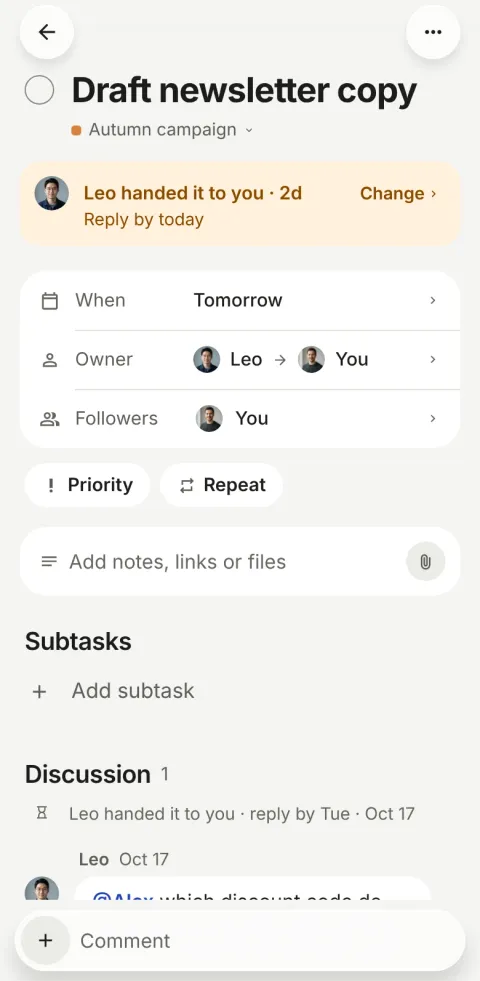
A week at a seven-person agency
-
Monday
Alex, the account lead, types “Homepage hero for Northwind Friday #northwind @mia” on the train. Mia has it before he arrives.
-
Tuesday
Mia hands the headline to Leo: “Six words, warmer than v2”, reply by Wednesday. She stays the owner.
-
Wednesday
Leo replies with three options. The task is back with Mia on its own: “Leo replied — it can continue”.
-
Thursday
Mia checks it off; it goes to Alex for his OK. He taps Request changes: “Bigger logo on mobile”. It’s back with Mia, with the note.
-
Friday
Alex approves from the notification. The client review is marked “Blocked by client reply · check Mon”, and nobody has to remember it.
A made-up team, using the app as it works today.
What agencies get from it
-
Sign-off built in
Any task can need someone’s OK: Approve or Request changes, in one tap.
-
Waiting on the client
Blocked by something outside, with a check date. On that day it comes back to Needs you.
-
Account leads see the risk
Following shows what is overdue or stuck across every client, worst first.
-
Freelancers and holidays
Away pauses nudges and warns whoever hands work to someone who is out.
Questions, answered
What is the best task app for a small agency?
It depends on how you work. If your projects need timelines, resourcing and client portals, a larger tool like Asana fits. If your team is under 20 people and the hard part is work passing between people and waiting on clients, Pinok is built for exactly that.
Can clients use it?
There is no separate guest role yet. You can invite a client to the workspace and add them only to their project, since project tasks are visible to that project’s members. Many agencies keep clients out and mark tasks “Blocked by client reply” instead.
Can we run several clients in one place?
Yes: one project per client or per job, each with its own people. A person can also belong to several workspaces, such as your agency’s and a client’s.
Compare, and other teams
- Pinok vs Asana Asana is built to run work across a whole company. Pinok is built for one small team that wants less to manage. Here is an honest look at both.
- Pinok vs Trello Trello made boards friendly for everyone. Pinok takes a different path: no columns, and every task in one person’s hands.
- For startups Everyone sees what needs them; founders see what is stuck. No status meeting.
- For studios Reviews in one tap, files on the task, and who is at capacity at a glance.
Get started
Give your team a task. Leave the chasing to Pinok.
Less setup. Fewer follow-ups. A clearer way to get things done together.
Free for small teams · iPhone, Android and the web · Teams of 2–20
Get Pinok