Hand off
Hand it off. It comes back.
Pass the next step to a teammate with a note. You stay the owner, and the task returns to you when they reply.
What is hand off?
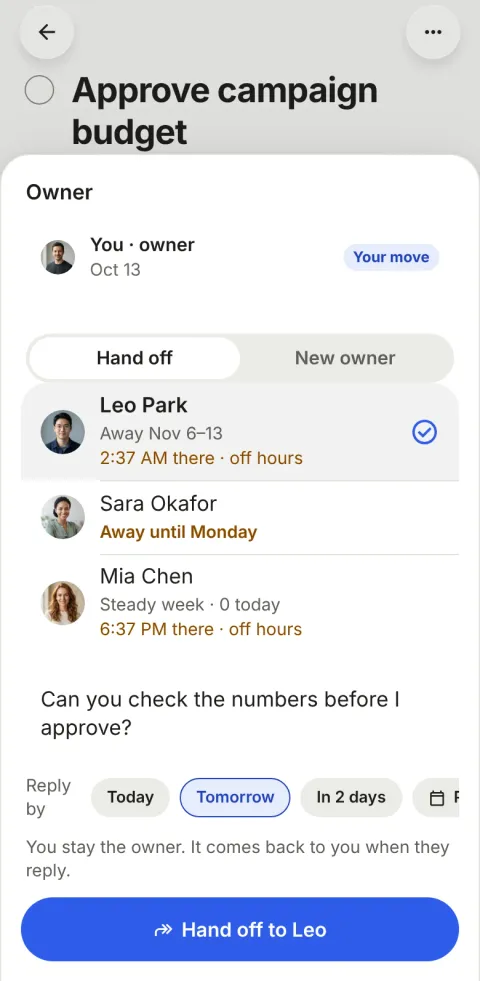
Hand off is how work moves between people in Pinok. The owner passes the next step to a teammate with a note and stays the owner. When the teammate replies, the task comes back to the owner by itself (“Leo replied — it can continue”), so nobody has to remember to follow up.
How does hand off work?
-
Hand it off with a note
On the task, open the owner and choose Hand off: pick Leo and say what you need. The toast says “Handed off to Leo · you stay the owner”, with Undo.
-
Add a reply-by day, if it matters
Today, Tomorrow, In 2 days or a date, counted in your workspace’s work days: on a Friday, “tomorrow” means Monday. None is picked by default, so a plain hand-off costs no extra tap.
-
Leo sees it in Needs you
It lands at the top of his My tasks as “Alex handed it to you · reply by Mon”. He replies in the discussion or hands it back.
-
It comes back by itself
His reply clears the wait (“Leo replied — it can continue”) and the next step is yours again. If the day passes in silence, your Needs you shows “No reply from Leo yet” with Nudge, Take it back and Later.
The details
-
Hand off or give it away
Hand off keeps you as the owner while someone else holds the next step. New owner gives the task away for good, with an optional “Ask for my OK when done”.
-
One reminder, not a chase
The person it waits on gets one reminder by themselves: on the morning of the reply-by day, or after 2 work days when there is no day. Nudge sends one more, at most once a day, never while they are away.
-
Blocked, and unblocked by itself
Mark a task blocked by another task or by something outside (“client reply · check Fri”). When that task is done, the owner hears “You can continue”; on the check day, the task comes back to Needs you.
-
Wait on a reply
Mention someone in a comment and turn on “Wait on Ivan’s reply”. The task waits on Ivan until he comments, then comes back.
-
History you never write
Every move is a quiet line in the discussion: “Alex handed it to Leo · reply by Thu”, “Leo handed it back”, “Mia gave it to you”.
-
Other time zones, shown
When a teammate’s clock differs from yours, the sheet shows “21:40 there · off hours”, so you know when an answer is realistic.
Questions about hand off
How is a hand-off different from assigning a task?
Assigning changes who owns the task and leaves you to remember to check back. A hand-off in Pinok keeps you as the owner, gives the next step to someone else with a note, and returns the task to you when they reply. If you want to give a task away entirely, use New owner.
What happens if they don’t reply?
With a reply-by day, they get one reminder on the morning of that day; once it passes, your Needs you shows “No reply from Leo yet” with Nudge, Take it back and Later. Without a day, they get one reminder after 2 work days, and the task shows how long it has been waiting (“Waiting on Leo · 3d”) under Waiting in your My tasks.
Can I hand off to someone who is away?
Yes, but the sheet tells you (“Away until Oct 28”), and reminders and nudges wait until they are back.
Compare and use cases
- Pinok vs Asana A fair comparison, as of October 2026.
- Pinok vs Trello A fair comparison, as of October 2026.
- For agencies Client work that changes hands with a note, approvals for sign-off, nothing waiting unseen.
- For studios Reviews in one tap, files on the task, and who is at capacity at a glance.
Get started
Give your team a task. Leave the chasing to Pinok.
Less setup. Fewer follow-ups. A clearer way to get things done together.
Free for small teams · iPhone, Android and the web · Teams of 2–20
Get Pinok