Approvals
An OK in one tap
Any task can have an approver. Checking it off sends it to them, and they Approve or Request changes, in one tap.
What are approvals?
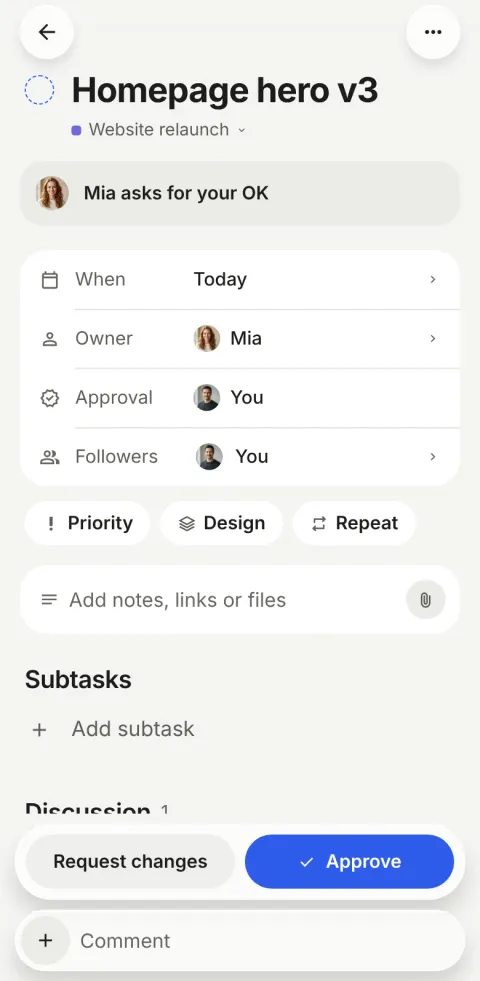
Approvals in Pinok are one optional role on a task. When the owner checks the task off, it isn’t done yet: it goes to the approver as “Waiting for your OK”, who taps Approve or Request changes. A change request sends it back to the owner with a note.
How do approvals work?
-
Add an approver
On the task, Approval: pick a person. Or give a task to a new owner and switch on “Ask for my OK when done”.
-
The owner checks it off
The checkbox sends it for the OK instead of closing it. The toast reads “Sent to Mia for OK · Undo”, and the checkbox wears a dashed ring while it waits.
-
The approver decides
It appears in their Needs you with Approve on the card. On the task, Approve and Request changes sit over the comment bar, so a question can still come first.
The details
-
Sent back, with a note
Request changes returns the task to its owner as “Sent back by Mia”, with what to change. The history keeps “Mia sent it back with changes”.
-
Approve from the notification
On the iPhone and Android apps, the push for “asks for your OK” carries an Approve button: the same action as the card, on an unlocked phone.
-
One approver, on purpose
No multi-stage workflows to design. One person says OK; the history shows who and when.
-
Fair by design
Only the owner or creator chooses the approver, and someone who just took a task can’t make themselves its approver for a day.
Questions about approvals
Who can approve a task?
Any member of the workspace can be a task’s approver. The task’s owner or creator chooses them; others can only clear it.
Can I approve from a notification?
Yes, on the iPhone and Android apps: the “asks for your OK” push has an Approve button, and a plain tap opens the task. On iPhone the phone must be unlocked first.
Do approvals cost extra?
No. Approvals are in every plan, Free included. They are part of the core of Pinok, not an add-on.
Compare and use cases
- Pinok vs Asana A fair comparison, as of October 2026.
- Pinok vs Todoist A fair comparison, as of October 2026.
- For agencies Client work that changes hands with a note, approvals for sign-off, nothing waiting unseen.
- For studios Reviews in one tap, files on the task, and who is at capacity at a glance.
Get started
Give your team a task. Leave the chasing to Pinok.
Less setup. Fewer follow-ups. A clearer way to get things done together.
Free for small teams · iPhone, Android and the web · Teams of 2–20
Get Pinok