Quick add
A task is a sentence
Type what needs doing, the way you’d say it. The date, the project and the person are picked out as you type.
What is quick add?
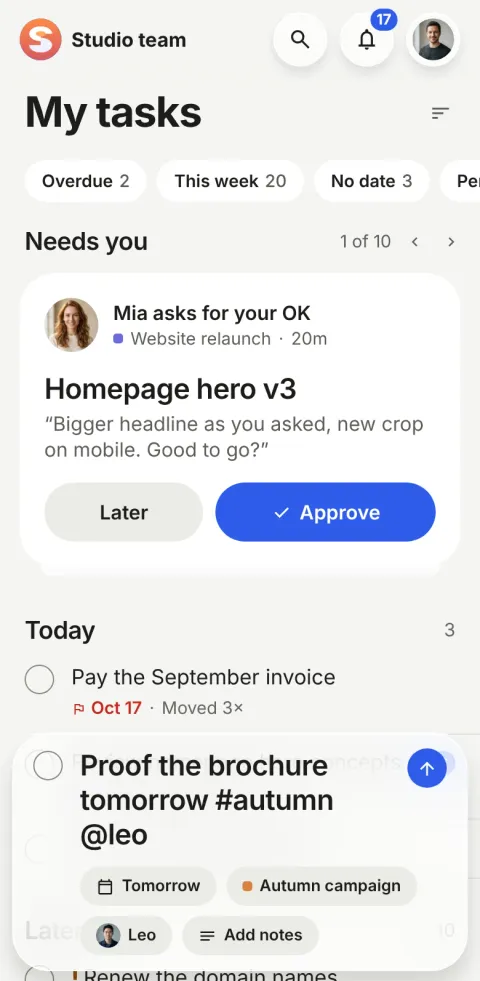
Quick add is how tasks are created in Pinok: you type one sentence and press return. Words like “tomorrow”, “#autumn” and “@leo” become the date, the project and the person as you type, shown as chips you can tap to change. There is no form to fill in.
How does quick add work?
-
Tap +
A bar rises over whatever you were looking at. Nothing dims behind it. On the web, press N.
-
Type one sentence
“Proof the brochure tomorrow #autumn @leo !” The chips show what was understood: Tomorrow, Autumn campaign, Leo, High.
-
Press return
The task is saved at once and opens; back on its list, the new row scrolls into view and lights up once.
The details
-
Dates
today, tonight, tomorrow, next week, in 3 days, Friday, next Tuesday, “by Thursday”, “due Monday”.
-
Repeats
every day, every weekday, every 2 weeks, every Monday, daily, weekly, monthly, yearly.
-
Project and person
#name picks a project (#Website/Design a stage too), @name picks a person. A task for someone else starts in their hands, and you follow it.
-
Priority
! on its own is High, !! is Urgent. Stuck to a word (“Call mom!”) it stays punctuation.
-
Notes when you need them
Add notes grows the bar into a card with formatted notes (bold, italic, lists) and photos or files.
-
Not AI, on purpose
The rules are simple and predictable, so the same sentence always means the same thing, and it works offline.
Questions about quick add
Does quick add understand natural language?
It understands the words people use for dates (“tomorrow”, “Friday”, “in 3 days”), repeats (“every Monday”), #project, @person and ! or !! for priority. It is rule-based, not AI, so it is predictable and works offline.
Can I create a task for someone else?
Yes: add @name. The task starts with them, and you follow it automatically, so you see in Following how it is going.
How many taps does it take to add a task?
One tap on +, one sentence, and return. A date, a project and a person cost no extra taps.
Compare and use cases
Get started
Give your team a task. Leave the chasing to Pinok.
Less setup. Fewer follow-ups. A clearer way to get things done together.
Free for small teams · iPhone, Android and the web · Teams of 2–20
Get Pinok